
VidaBay Snap Product Self-Troubleshooting Guide
1. Unboxing Pre-Check: Pre-empt Hardware Risks
- Package Integrity Inspection
Check the package for extrusion, damage or tampering immediately. For severe damage, take full photos, do not open/use the product.
- Product Body Integrity Inspection
Check the magnet for intactness (no scratches, dents, deformation, undamaged NFC area) and complete accessories. For damage/missing parts, keep original packaging and contact after-sales within 24 hours.
2. Core Troubleshooting for Transfer Failures
Official Standard Transfer Alignment Reference
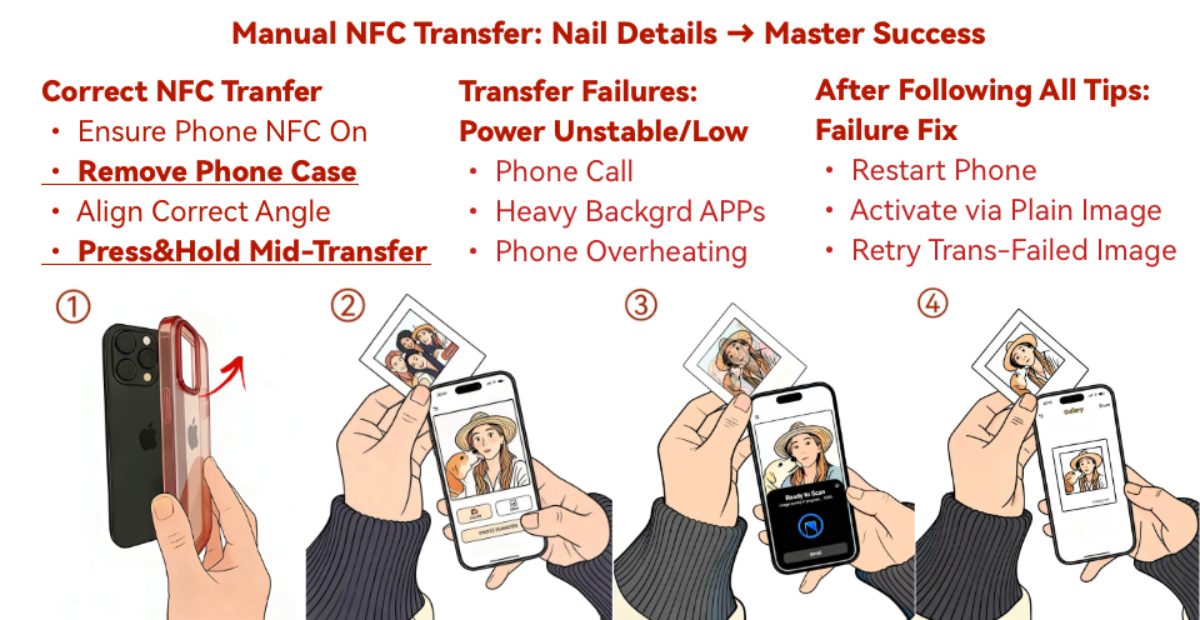
- Pre-Transfer: Remove Phone Case & Magnetic Accessories
Thick/magnetic accessories block NFC signals (main cause of failure). Remove all cases/accessories to ensure direct contact between phone and magnet.
- Mid-Transfer Disconnection/Failure: Precise Alignment + Stable Fit
Offset causes signal loss. Align iPhone top-left corner with the magnet’s mark; pinch tightly and keep fixed until transfer completes.
- Transfer Untriggered: Check APP Version & Compatibility
- Update APP: Upgrade VidaBay Snap APP to the latest version in App Store.
- Model Check: NFC transfer only supports iPhone 13–17 series; success is not guaranteed for other models.
3. Supplementary Troubleshooting
- Abnormal Display After Transfer
The 4-color E Ink screen does not display blue or green. Green is replaced with a mix of yellow and gray; blue becomes gray, while image brightness and contrast are fully preserved. The APP automatically crops images to 1:1 ratio; adjust and re-transfer accordingly.
- APP Unresponsive/Crashing
Close and reopen the APP; restart iPhone if needed. Update iOS to the latest official version for compatibility.
4. After-Sales Support
If issues persist after full troubleshooting, contact our support email at feedback@vidabay.net with your device information, problem details and screenshots. Our technical team will provide one-to-one support within 1 working day.
Follow our official blog and social media for usage tips and updates.
Best regards,
VidaBay Team